CNC4PC Manual Installation Pendant for Mach4 with C22M1
Used software: Mach4 4.2.0.4612, PLUGINS ESS V275
Used hardware: C82 R4 and C22M1 R1.
STEP 1:On many systems, MS Windows can recognise the USB drivers, but if not, you can download them from here:
https://cnc4pc2.s3.us-east-2.amazonaws.com/productattachments/files/Driver_FT232_USB_UART.zip
STEP 2: Connect the C22M1 to the USB port. Right-click on the USB Serial port, and Select 'Update Driver Software'.

STEP 3:

STEP 4:

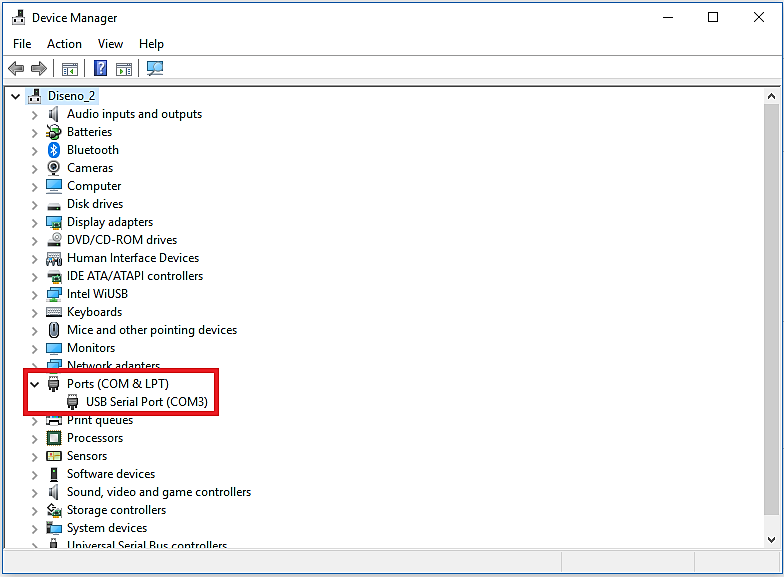
STEP 5: Configure/Control/Plugins
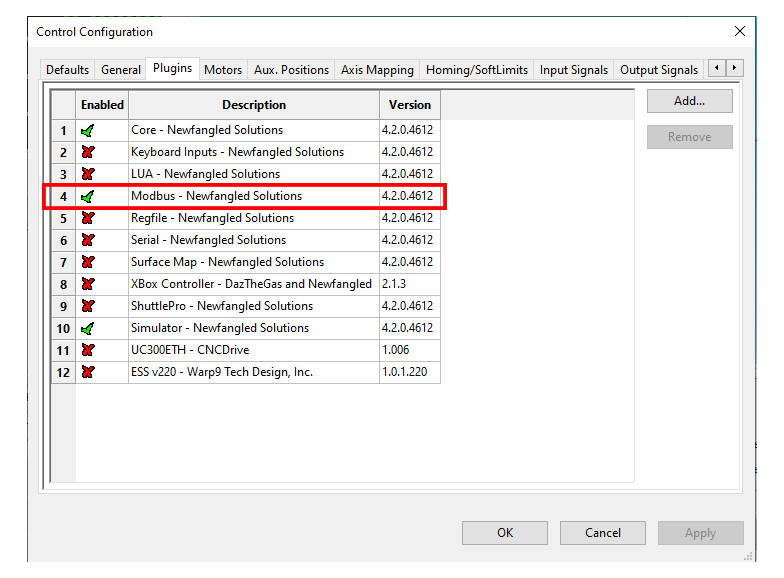
STEP 6: Configure/Plugins/Modbus
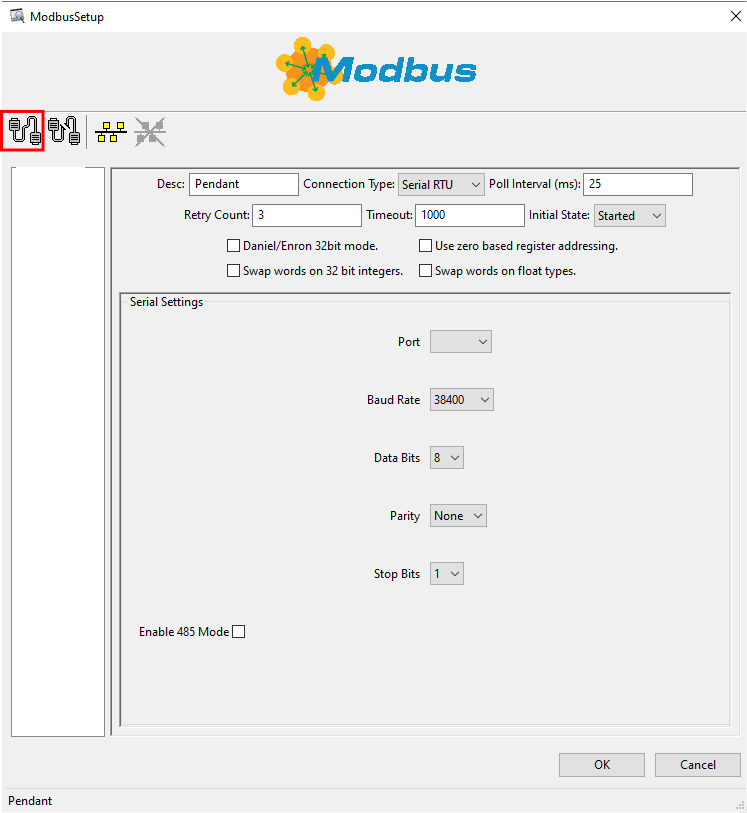
STEP 7: Configuring the control software:
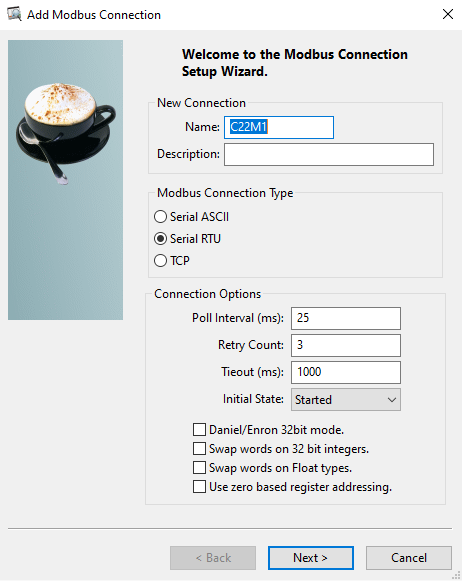
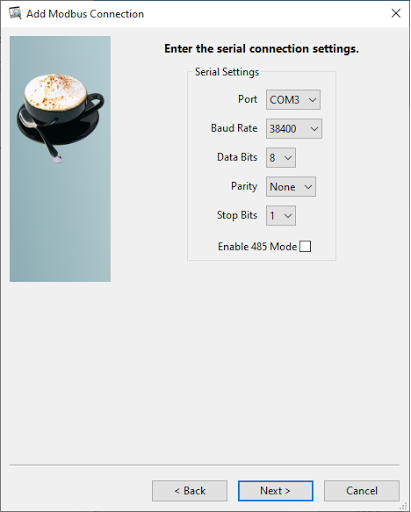
STEP 8: Add Modbus Function
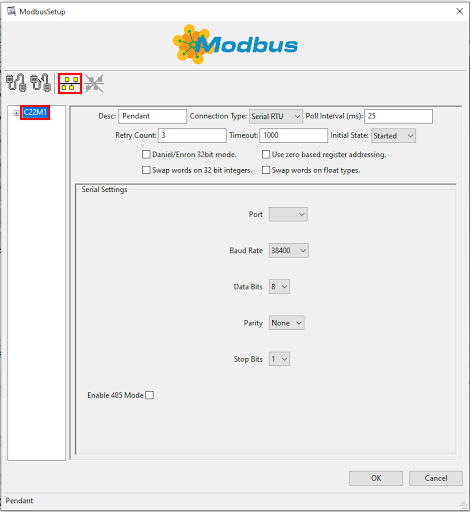
STEP 9: To configure the Encoder, use the following sample configuration screen:
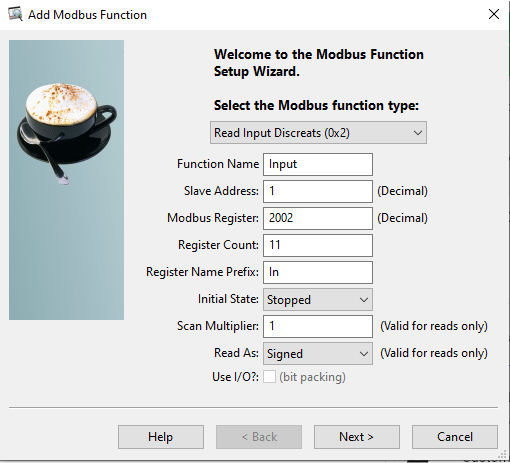
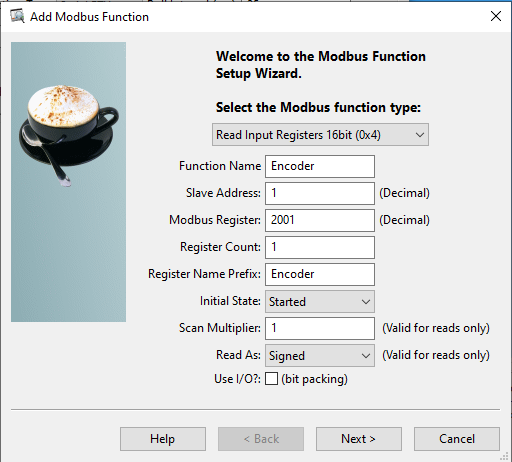
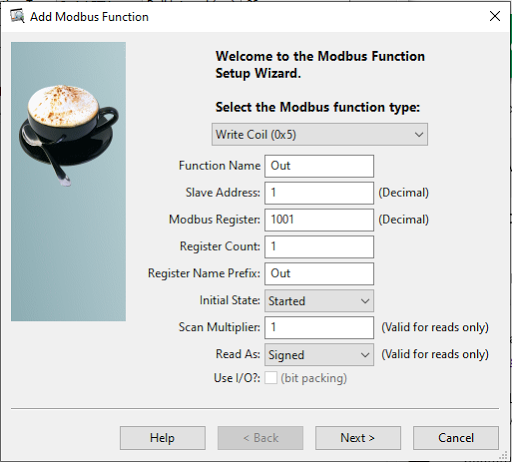
Mach4 configure
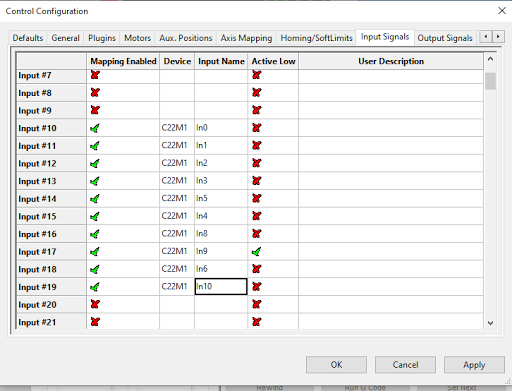
STEP 10: Configure/Controller/Input Signal
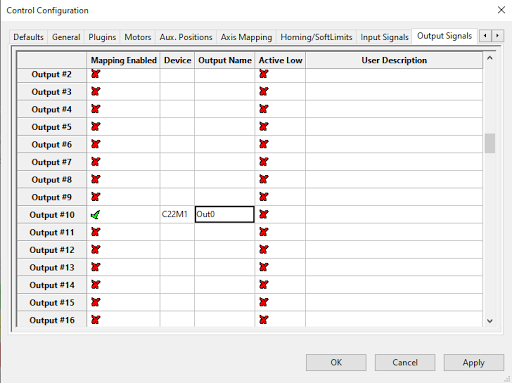
STEP 11: Configure/Controller/Output Signal
STEP 12: Configure/Controller/MPGs

STEP 13: You can download, install, and use this screen:
wx6_mpg.zip
Or you can edit the screen manually by adding the Lua code as explained below.
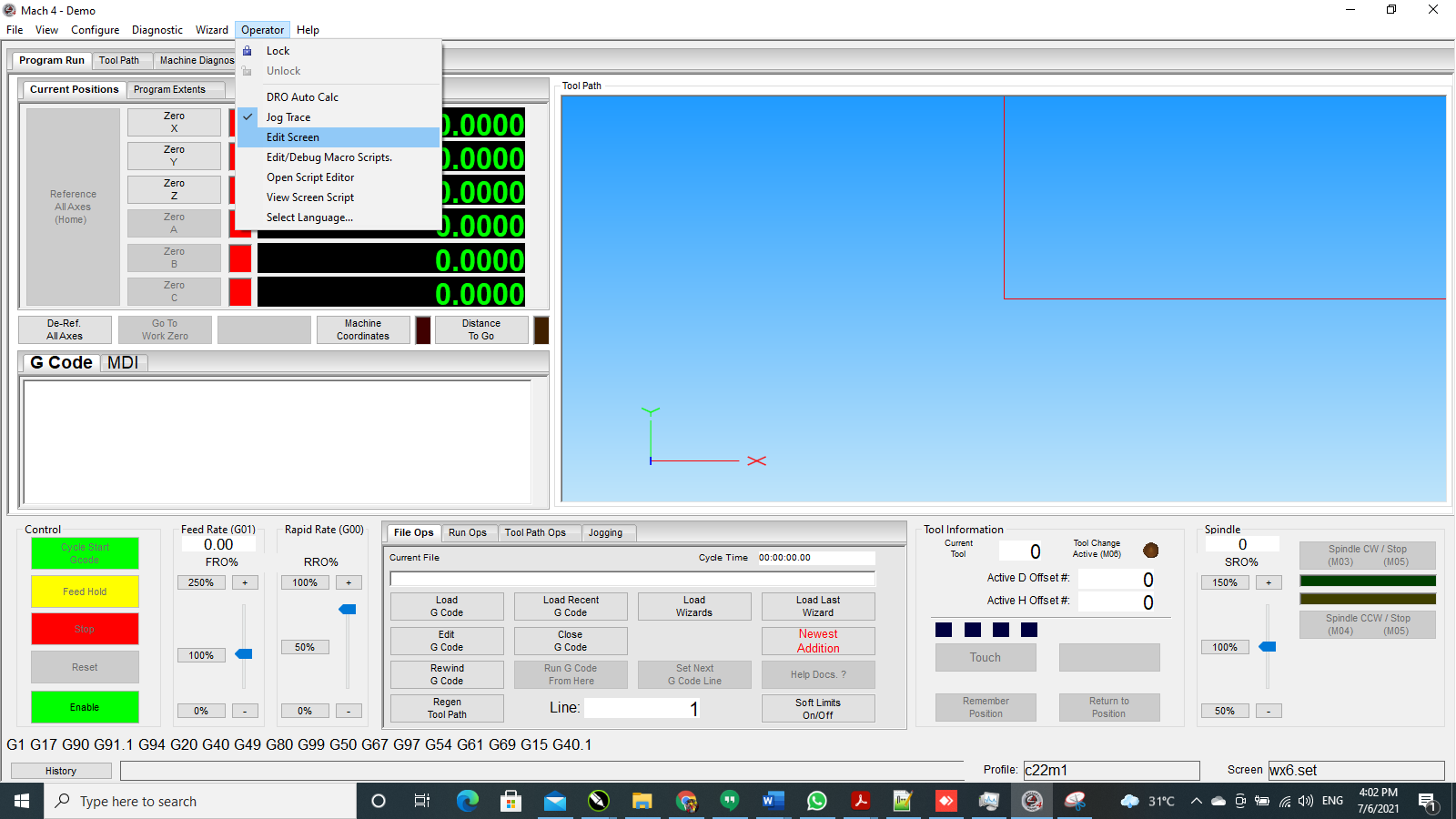
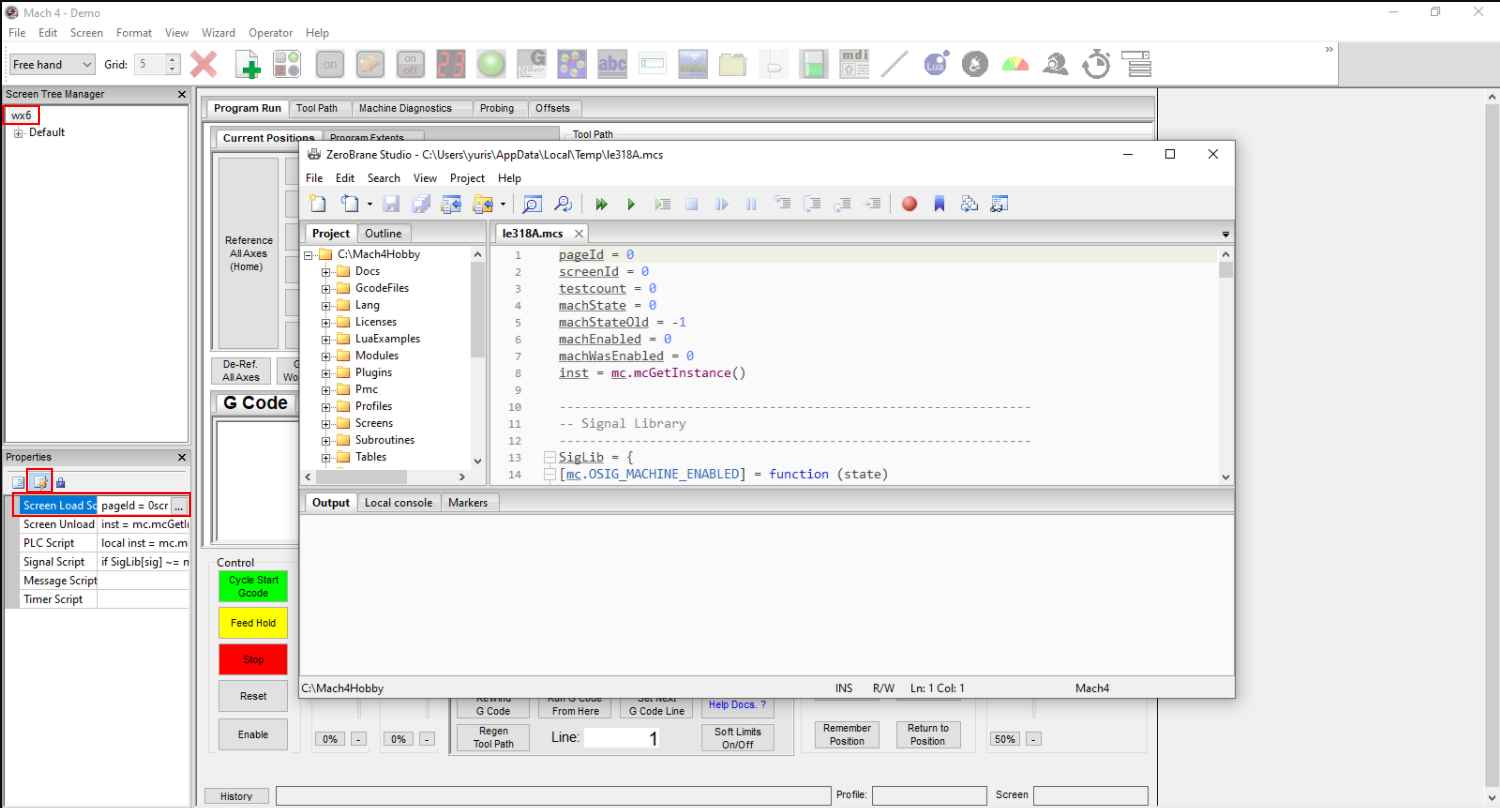
STEP 13: Copy the following code at the end of the screen script
--------------------------------------
-- CNC4PC Pendant --
--------------------------------------
-- These simply run the CNC4PCPendant function if their state changes.
SigLib = {
[mc.ISIG_INPUT10] = function (state) CNC4PCPendant() end,
[mc.ISIG_INPUT11] = function (state) CNC4PCPendant() end,
[mc.ISIG_INPUT12] = function (state) CNC4PCPendant() end,
[mc.ISIG_INPUT13] = function (state) CNC4PCPendant() end,
[mc.ISIG_INPUT14] = function (state) CNC4PCPendant() end,
[mc.ISIG_INPUT15] = function (state) CNC4PCPendant() end,
[mc.ISIG_INPUT16] = function (state) CNC4PCPendant() end,
[mc.ISIG_INPUT17] = function (state) CNC4PCPendant() end,
[mc.ISIG_INPUT18] = function (state) CNC4PCPendant() end,
[mc.ISIG_INPUT19] = function (state) CNC4PCPendant() end
}
---------------------------------------------------------------
-- CNC4PC Pendant function.
---------------------------------------------------------------
function CNC4PCPendant()
    local hSig, rc = mc.mcSignalGetHandle(inst, mc.ISIG_INPUT10)
    local XSelection = mc.mcSignalGetState(hSig)
    local hSig, rc = mc.mcSignalGetHandle(inst, mc.ISIG_INPUT11)
    local YSelection = mc.mcSignalGetState(hSig)
    local hSig, rc = mc.mcSignalGetHandle(inst, mc.ISIG_INPUT12)
    local ZSelection = mc.mcSignalGetState(hSig)
    local hSig, rc = mc.mcSignalGetHandle(inst, mc.ISIG_INPUT13)
    local ASelection = mc.mcSignalGetState(hSig)
    local hSig, rc = mc.mcSignalGetHandle(inst, mc.ISIG_INPUT14)
    local Step001 = mc.mcSignalGetState(hSig)
    local hSig, rc = mc.mcSignalGetHandle(inst, mc.ISIG_INPUT15)
    local Step010 = mc.mcSignalGetState(hSig)
    local hSig, rc = mc.mcSignalGetHandle(inst, mc.ISIG_INPUT16)
    local Step100 = mc.mcSignalGetState(hSig)
    local hSig, rc = mc.mcSignalGetHandle(inst, mc.ISIG_INPUT17)
    local PenStop = mc.mcSignalGetState(hSig)
    local hSig, rc = mc.mcSignalGetHandle(inst, mc.ISIG_INPUT18)
    local BSelection = mc.mcSignalGetState(hSig)
    local hSig, rc = mc.mcSignalGetHandle(inst, mc.ISIG_INPUT19)
    local CSelection = mc.mcSignalGetState(hSig)

    local PenJogOn, rc = mc.mcSignalGetHandle(inst, mc.OSIG_OUTPUT10)

    if XSelection == 1 then
        mc.mcMpgSetAxis(inst, 0, 0)
        mc.mcCntlSetLastError(inst, "X Selected")
        mc.mcSignalSetState(PenJogOn, 1)
    elseif YSelection == 1 then
        mc.mcMpgSetAxis(inst, 0, 1)
        mc.mcCntlSetLastError(inst, "Y Selected")
        mc.mcSignalSetState(PenJogOn, 1)
    elseif ZSelection == 1 then
        mc.mcMpgSetAxis(inst, 0, 2)
        mc.mcCntlSetLastError(inst, "Z Selected")
        mc.mcSignalSetState(PenJogOn, 1)
    elseif ASelection == 1 then
        mc.mcMpgSetAxis(inst, 0, 3)
        mc.mcCntlSetLastError(inst, "A Selected")
        mc.mcSignalSetState(PenJogOn, 1)
    elseif BSelection == 1 then
        mc.mcMpgSetAxis(inst, 0, 4)
        mc.mcCntlSetLastError(inst, "B Selected")
        mc.mcSignalSetState(PenJogOn, 1)
    elseif CSelection == 1 then
        mc.mcMpgSetAxis(inst, 0, 5)
        mc.mcCntlSetLastError(inst, "C Selected")
        mc.mcSignalSetState(PenJogOn, 1)
    else
        mc.mcMpgSetAxis(inst, 0, -1)
        mc.mcCntlSetLastError(inst, "No Axis Selected")
        mc.mcSignalSetState(PenJogOn, 0)
    end

    if Step001 == 1 then
        mc.mcMpgSetInc(inst, 0, .001)
    elseif Step010 == 1 then
        mc.mcMpgSetInc(inst, 0, .010)
    elseif Step100 == 1 then
        mc.mcMpgSetInc(inst, 0, .100)
    end

    if PenStop == 1 then
        mc.mcCntlEStop(inst)
    end
end
STEP 14: Copy on PLC First Run
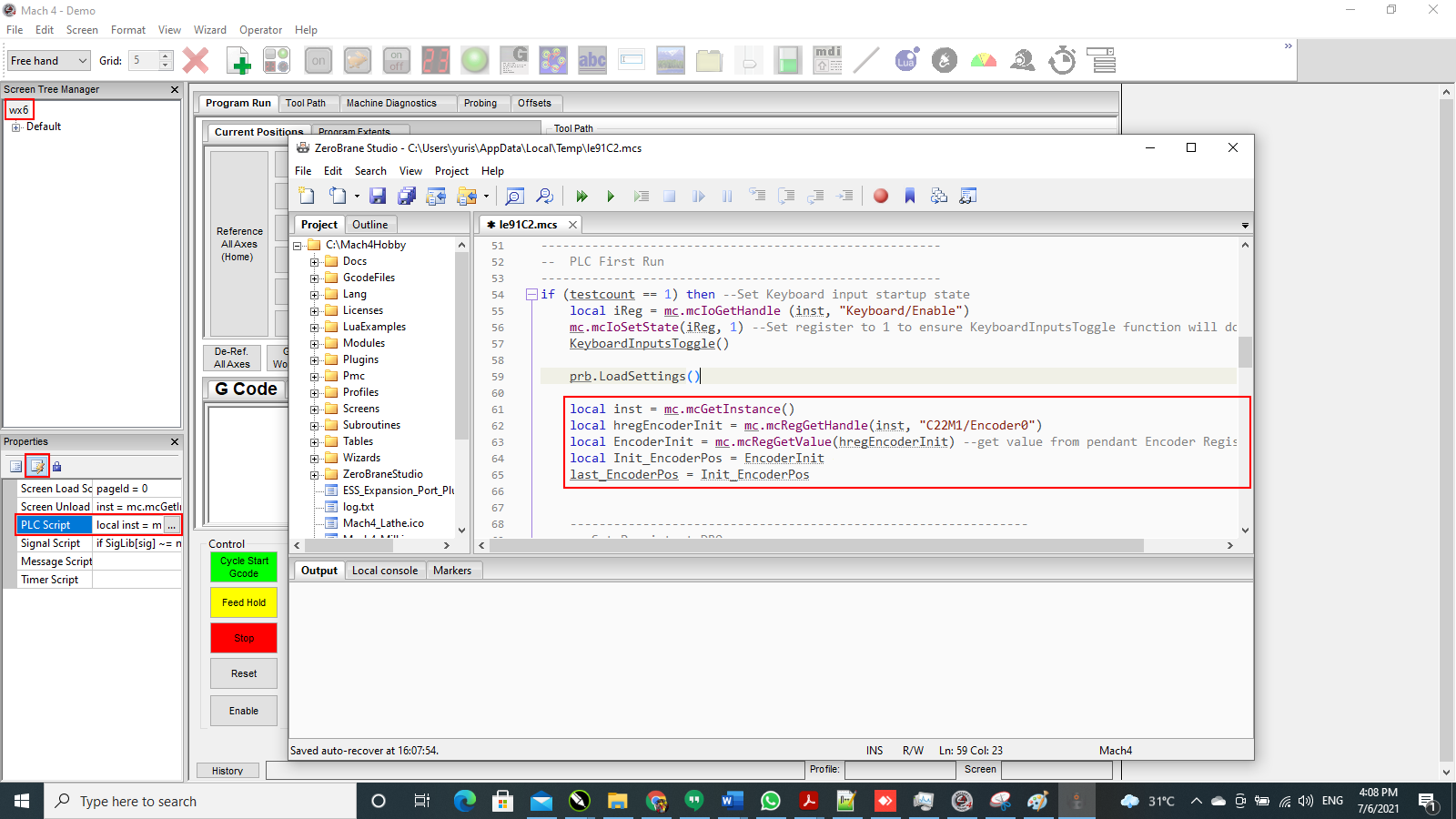
local inst = mc.mcGetInstance()
local hregEncoderInit = mc.mcRegGetHandle(inst, "C22M1/Encoder0")
local EncoderInit = mc.mcRegGetValue(hregEncoderInit)
local Init_EncoderPos = EncoderInit
last_EncoderPos = Init_EncoderPos
STEP 15: Copy to the end of PLC Run.
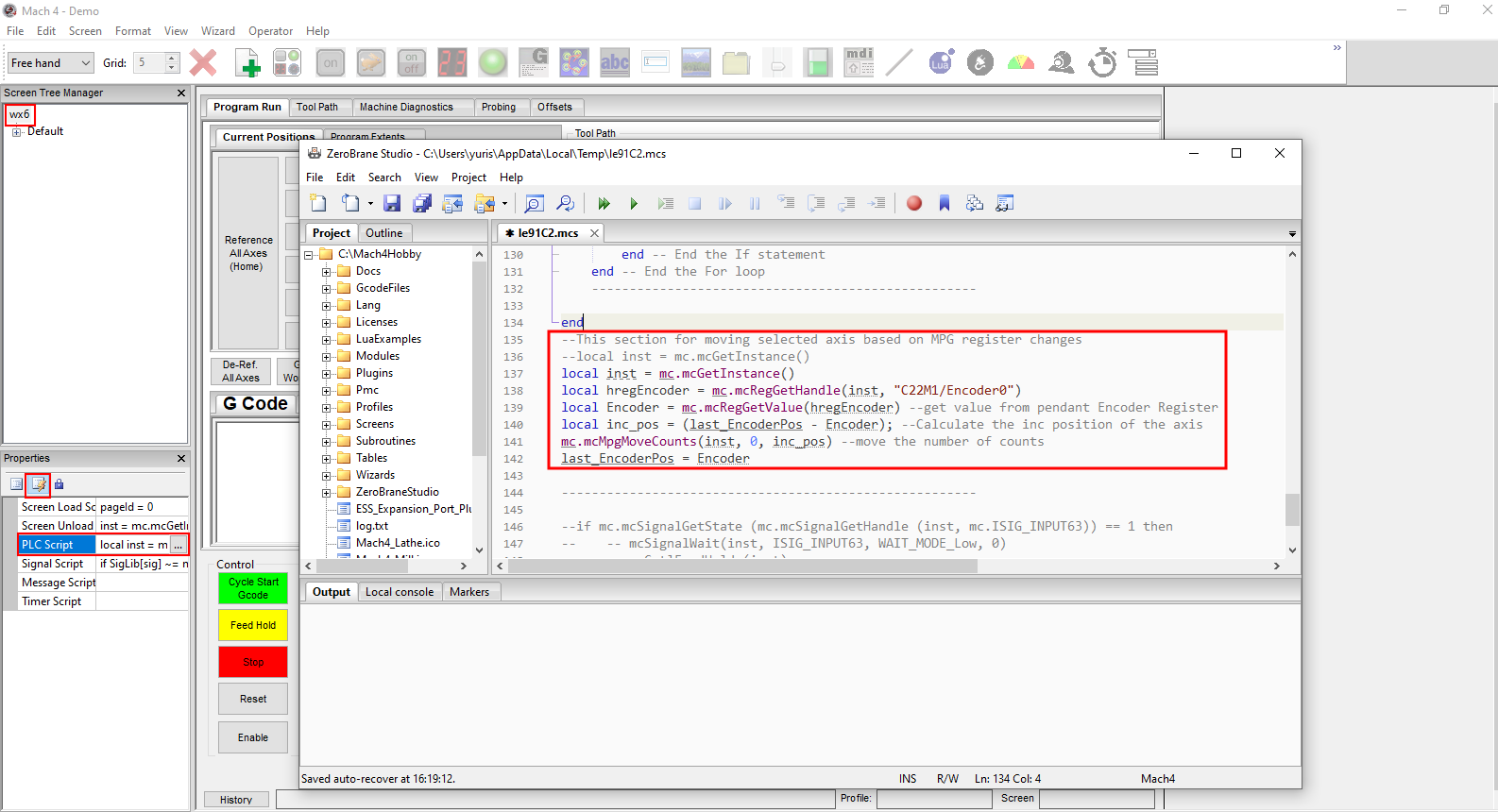
local inst = mc.mcGetInstance()
local hregEncoder = mc.mcRegGetHandle(inst, "C22M1/Encoder0")
local Encoder = mc.mcRegGetValue(hregEncoder)
local inc_pos = (last_EncoderPos - Encoder)
mc.mcMpgMoveCounts(inst, 0, inc_pos)
last_EncoderPos = Encoder