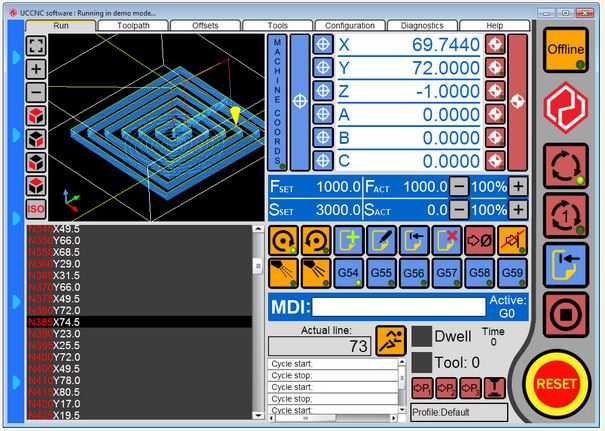
OVERVIEW
The UCCNC is a machine control software. It uses and external hardware to generate signals to produce coordinated motion on upto 6 machine axis. The external hardware is a motion controllerdevice which is currently our UC100 or UC300 or UC400ETH motion controller.
UCCNC software.
- Supports the UC100, UC300 and UC400ETH motion controllers.
- Controls machines upto 6-axis.
- RS274 G and M codes execution.
- Unlimited number of user text macros with flexible script engine.
- Upto 400kHz operation. (selectable 25kHz, 50kHz, 100kHz, 200kHz, 400kHz with 20us, 10us, 5us, 2.5us and 1.25us pulse widths.) Note: Maximum step frequency depends on the motion controller device used.
- Exact stop and cont.velocity interpolations with highly configurable advanced look ahead function.
- G54..G59 work offsets and G52/G92 temporary offset.
- 3D toolpath viewer.
- OpenGL screen optimised for fast screen update rates with low CPU/GPU usage.
- Built in visual screen editor.
- 48 configurable hotkeys.
- 48 configurable inputs trigger to assign physical input pins to UCCNC function calls.
- 48 configurable outputs trigger to assign virtual LEDs to physical output pins.
- Parametric programming using internal variables and programming mathematical expressions.
- Controls THC control for plasma cutters. (M205 and M206 macros)
- M10/M11 macros for fast syncronous outputs for laser cutting applications.
- G33 and G76 syncronous thread cutting with free running spindle and encoder feedback to the motion controller.
- G33.1 and G33.2 rigid tapping with Z-axis syncronised to spindle motor.
- Supports wired MPGs and the UCR200 wireless via plugin.
- Built in basic CAM module with DXF files import.
- Stopless smooth backlash compensation with adjustable backlash acceleration.
- Plugin interface with Visual C# example plugin template. Plugin works with C#, VB, C++ programming languages.
- Fast laser scan type engraving plugin, webcamera plugin, Xbox360 controller plugin, 3D printer plugin etc..
- Fast communication with optimised buffering technic producing low button press to event execution time.
- Extremely low jitter on the step and direction signals for smooth, high speed and precise motors operation.
- Runs in demo (simulation mode) without a software license key.
Downloads for this product:
1.) User's manual
2.) UCCNC software installer
3.) Software prerequirements (required for XP only.)
Video tutorials:
1.) UCCNC software installation video
2.) UCCNC setup with Mach3 .xml profile import
3.) UCCNC software toolpath demonstration
4.) Creating a basic toolpath with VCarvePRO and exporting the code to the UCCNC software
Screensets:
[English language]